
Punycode explained
What is Punycode?
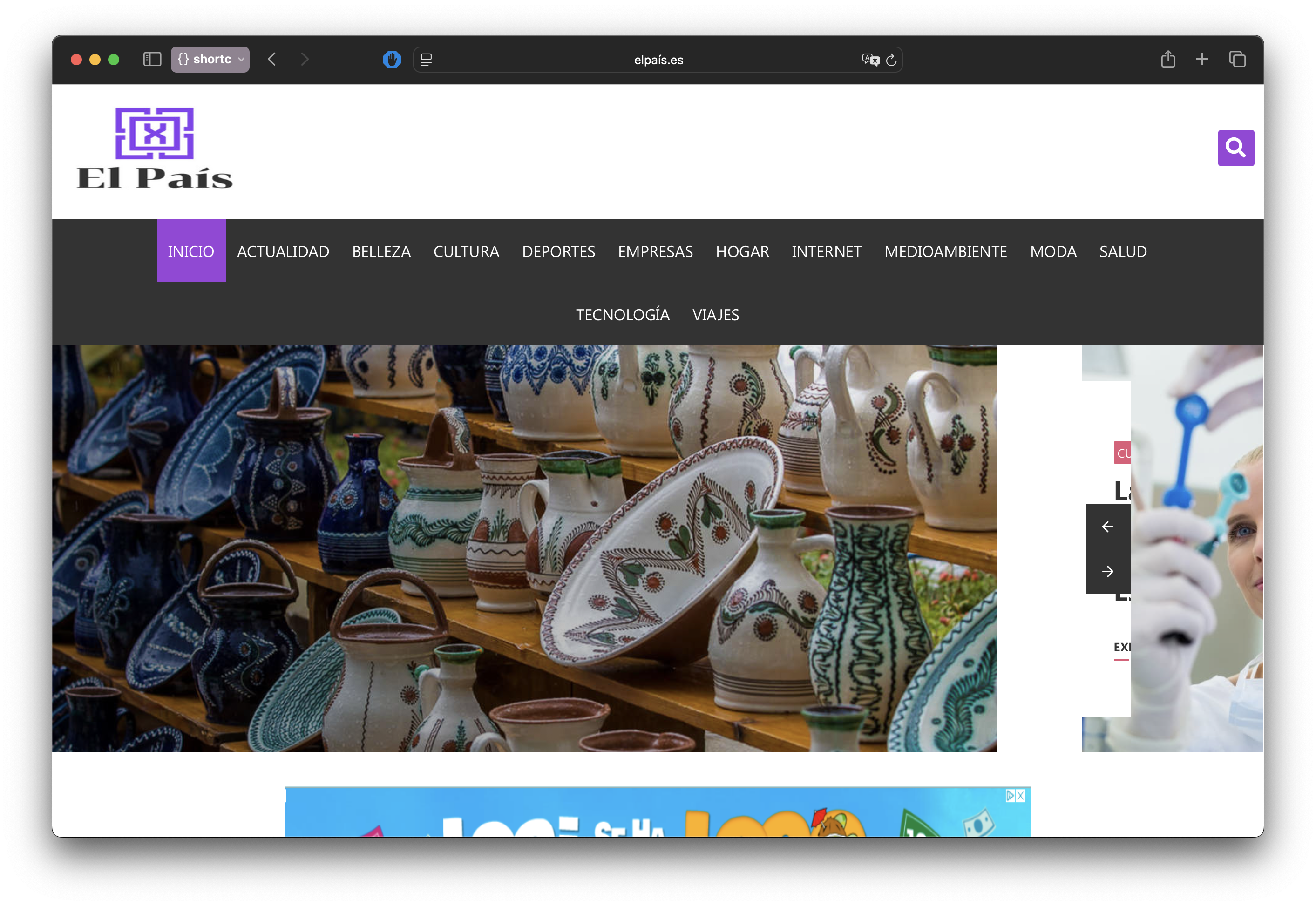 A Spanish website using an internationalized domain name
Punycode is an encoding method that converts Unicode characters into a limited subset of ASCII -- specifically the lowercase letters a-z, digits 0-9, and the hyphen. It exists because the Domain Name System (DNS), the infrastructure that translates domain names to IP addresses, only understands ASCII1. DNS was built in 1983, years before Unicode existed, and its character rules haven't changed since.
That's a problem when half the world doesn't use the Latin alphabet. A user in Beijing, Moscow, or Cairo shouldn't have to memorize Latin-character domains just to navigate the web. Punycode bridges this gap -- it lets anyone register and use a domain name in their own script, while keeping DNS happy behind the scenes. The encoded form always starts with the prefix xn--, which signals to DNS that the label contains encoded Unicode2. So when you see xn--nxasmq6b.com in a server log, that's just Punycode doing its job.
The name itself is a play on "Unicode" -- the algorithm is "puny" because it uses a small character set, produces short encoded strings (DNS labels can't exceed 63 characters3), and has a surprisingly compact reference implementation.
When you actually need Punycode
Most developers never think about Punycode until they hit one of these situations:
- Registering an internationalized domain name. The registrar stores the
xn--form even if you typed Unicode into the search box. - Configuring DNS records. Zone files only speak ASCII -- you'll enter
xn--nxasmq6b.com, not the Greek original. - Getting an SSL certificate. Certificate authorities issue certs for the Punycode form. If you request a cert for the Unicode version without converting first, some tools will just reject it.
- Running a WHOIS lookup. Try feeding
мосрег.рфto most WHOIS clients and nothing comes back. You needxn--l1acf9a0a.xn--p1ai. - Setting up email on an IDN domain. The part after the
@has to be Punycode-compatible; the part before uses a completely different mechanism. - Playing with emoji domains. Yes,
💩.wsresolves to a real website. It's Punycode under the hood.
Outside of these scenarios, Punycode is invisible. Your browser handles the conversion automatically, and you'd never know it was happening.
Registering an IDN domain
ICANN requires a language tag at registration time -- you pick the script/language once, and the registry locks it in4. This is a one-time choice. You can't change it later, and it determines which characters are valid in your domain label.
Not every TLD supports every language. Each registry decides independently which scripts to allow, so availability is uneven. You might register a Cyrillic domain under .com but find that the same characters aren't available under .de. As of the June 2025 IDN annual report, 151 TLDs have been delegated as IDNs, covering 37 languages across 23 scripts5. Registries have published over 11,000 IDN tables -- essentially lookup tables that define which Unicode characters are valid for a given TLD and language combination5.
The registration process itself is straightforward. Most registrars let you search using either the Unicode characters directly or a pre-converted Punycode string6. You type münchen.de, the registrar converts it to xn--mnchen-3ya.de behind the scenes, checks availability, and if it's open, registers the ACE form. Some registrars also ask you to confirm the language tag from a dropdown -- German, in this case.
Email and IDN domains
Here's where it gets messy. Punycode only applies to the domain part of an email address -- everything after the @ sign. The local part (before @) is a different story entirely: it uses UTF-8 encoding through the SMTPUTF8 extension defined in RFC 65317.
So 用户@xn--fiq228c.com is technically valid. The domain is Punycode, the local part is UTF-8. Two different encodings in a single email address. SMTP wasn't designed for any of this -- the SMTPUTF8 extension was bolted on after the fact, and adoption has been slow.
The practical reality is worse than the spec suggests. Many web forms reject email addresses with non-ASCII characters outright -- their validation regex only expects [a-zA-Z0-9] and a handful of special characters. Even large email providers have been slow to support SMTPUTF88. Gmail added support in 2014, but plenty of smaller providers still don't accept internationalized addresses.
If you're running a business on an IDN domain, keep a plain ASCII domain around as a fallback. Forward email from the ASCII domain to your IDN inbox. It's annoying, but it saves you from the inevitable "your email address is invalid" error on half the forms you fill out.
DNS, SSL, and WHOIS with IDN domains
DNS zone files always use the xn-- ACE form. There's no UTF-8 mode for zone files. If you're editing a zone manually or through an API, you convert first, then create your A/AAAA/CNAME records using the Punycode label. Your DNS provider might show the Unicode version in their dashboard as a courtesy, but what's stored is ASCII.
SSL/TLS certificates work the same way. The certificate's Common Name or Subject Alternative Name contains the Punycode string, not the Unicode domain9. Let's Encrypt has supported IDN certificates since October 2016, and Certbot handles the conversion if you pass it the xn-- form directly. Some CAs accept the Unicode form in their web interface and convert it for you; others don't. When in doubt, convert to Punycode before requesting the cert.
WHOIS is the most annoying of the three. Most command-line WHOIS clients don't do any IDN-to-Punycode conversion -- they just send whatever string you give them. Feed them Unicode and the lookup fails silently or returns nothing. You need to convert the domain to its xn-- form before querying. Web-based WHOIS tools from registrars usually handle the conversion automatically, but the raw protocol doesn't.
Browser address bar behavior
Each browser has its own policy for when to show the pretty Unicode version of a domain versus the raw xn-- Punycode. The differences matter because they determine how likely users are to notice a spoofed domain.
Chrome shows Unicode for domains where all characters belong to the same script, but falls back to Punycode for mixed-script labels or anything that triggers its confusable-detection algorithm10. So münchen.de displays fine (all Latin), but a domain mixing Latin and Cyrillic characters shows as xn--.... Chrome's checks are the most elaborate of any browser -- skeleton matching, digit-spoof detection, whole-script confusable detection -- but they're not exhaustive.
Firefox shows IDN by default and is generally more permissive than Chrome. Power users can force Punycode display for all IDN domains by setting network.IDN_show_punycode to true in about:config11. Firefox follows the "Moderately Restrictive" profile from Unicode Technical Standard #39, which blocks obvious script-mixing but allows approved combinations like Latin + CJK for Japanese domains.
Safari is the most aggressive. It blocks all mixed-script IDNs and won't display Unicode for all-Cyrillic or all-Greek labels unless the TLD matches (like .ru for Cyrillic)12. That's why Safari was the only major browser that wasn't vulnerable to the 2017 apple.com Punycode phishing attack. The tradeoff is that legitimate IDN domains get shown as Punycode strings more often than in other browsers.
Edge follows Chromium's behavior, since it's built on the same engine.
Emoji domains
Emoji in domain names are just Unicode code points, so they encode to Punycode like anything else. ☕.ws becomes xn--53h.ws. Technically valid, technically functional.
But only a handful of TLDs actually allow emoji registration. The main ones are .ws (Samoa), .to (Tonga), .fm (Micronesia), and .kz (Kazakhstan)13. A few others like .tk, .ml, .ga, .gq, .cf, .st, and .uz have also accepted them at various points, though some of those free-registration TLDs have changed their policies over the years. The major generic TLDs -- .com, .net, .org -- don't allow emoji at all. ICANN's rules for gTLDs effectively prohibit it.
Emoji domains are a fun novelty, and some brands have used them for marketing campaigns (Coca-Cola ran one on .ws back in 2015). But they're impractical for anything serious. Many email systems can't handle them, search engines struggle to index them consistently, and copy-pasting an emoji URL from one app to another is unreliable. The Punycode form xn--53h.ws is what actually gets transmitted, and that's what you'll see in server logs, analytics tools, and anywhere else that doesn't bother decoding.
How Punycode encoding works
Under the hood, Punycode is a specific instance of the Bootstring algorithm, which was designed to represent strings from a large character set using a much smaller one14. Adam Costello published the specification as RFC 3492 in March 2003 while at UC Berkeley.
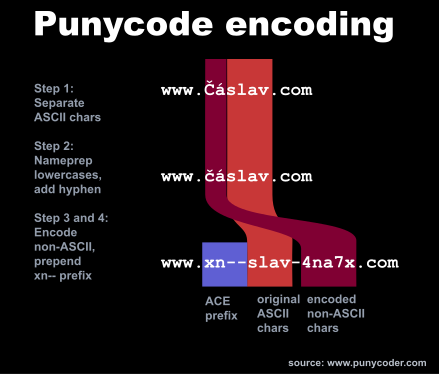
The encoding runs in four steps. Here's how it works using "čáslav" (a Czech town) as an example:
 Punycode algorithm
Step 1 -- Separate ASCII characters. Pull out every character that's already plain ASCII. From "čáslav", that gives us: slav.
Step 2 -- Add a hyphen separator. If there were any ASCII characters, append a trailing hyphen to mark where they end: slav-. The last hyphen in the output is always the separator, so hyphens inside the original input don't cause ambiguity.
Step 3 -- Encode the non-ASCII characters. The remaining characters (č and á) get processed by the Bootstring algorithm, which encodes their Unicode code points and positions into a sequence of a-z and 0-9. The result gets appended: slav-4na7x15.
Step 4 -- Prepend the xn-- prefix. The final DNS-compatible label is xn--slav-4na7x.
One thing that makes Bootstring clever: it adapts its internal state based on character frequency, so the encoded output stays as short as possible. That matters when you only have 63 characters to work with per DNS label.
Punycode examples
The table below shows how different inputs get transformed. Pure ASCII strings pass through unchanged -- Punycode only kicks in when there's at least one non-ASCII character.
| Input | Punycode output | Script |
|---|---|---|
café | xn--caf-dma | French |
münchen | xn--mnchen-3ya | German |
español | xn--espaol-zwa | Spanish |
école.fr | xn--cole-9oa.fr | French domain |
bücher.de | xn--bcher-kva.de | German domain |
| Chinese: 中文 | xn--fiq228c | Chinese |
| Japanese: 日本語 | xn--wgv71a119e | Japanese |
| Korean: 한국어 | xn--3e0bk47br7k | Korean |
| Arabic: تست | xn--pgba0a | Arabic |
| Greek: δοκιμή | xn--jxalpdlp | Greek |
The pattern is consistent: ASCII characters appear at the front of the encoded string, followed by the hyphen separator and the Bootstring-encoded non-ASCII portion. Domains with TLD extensions (like ecole.fr) encode only the label containing non-ASCII characters -- the .fr part stays as-is.
IDN homograph attacks -- the security risk
Punycode made the web more accessible for billions of users. It also handed attackers a powerful new tool.
An IDN homograph attack exploits the fact that many characters from different scripts look identical. The Cyrillic lowercase "a" (U+0430) is visually indistinguishable from the Latin "a" (U+0061) on screen, but they're completely different characters in Unicode16. An attacker can register a domain using these lookalikes, and the browser -- faithfully decoding the Punycode -- displays what appears to be a legitimate URL.
The concept was first described in 2001 by Evgeniy Gabrilovich and Alex Gontmakher at the Technion in Israel. They registered a spoofed microsoft.com using Cyrillic characters and published their findings in Communications of the ACM17. Their warning proved prescient.
Homoglyph examples:
| Latin | Cyrillic lookalike | Latin code point | Cyrillic code point | Spoof target |
|---|---|---|---|---|
| a | a (Cyrillic) | U+0061 | U+0430 | apple.com |
| e | e (Cyrillic) | U+0065 | U+0435 | ebay.com |
| o | o (Cyrillic) | U+006F | U+043E | google.com |
| p | p (Cyrillic) | U+0070 | U+0440 | paypal.com |
| c | c (Cyrillic) | U+0063 | U+0441 | cisco.com |
| x | x (Cyrillic) | U+0078 | U+0445 | express.com |
Cyrillic is the biggest threat here because so many of its lowercase letters are pixel-perfect matches for Latin ones. An attacker can construct an all-Cyrillic domain that looks exactly like an ASCII domain -- no mixed-script tricks needed.
The most notorious demonstration happened in April 2017. Security researcher Xudong Zheng registered xn--80ak6aa92e.com, which browsers decoded to what appeared to be apple.com -- every character was Cyrillic18. Chrome, Firefox, and Opera all showed apple.com in the address bar, complete with a valid SSL certificate. Zheng had reported the bug to Chrome in January 2017 and received a $2,000 bounty. Chrome patched it in version 5810. This single incident is probably the reason most developers have even heard of Punycode.
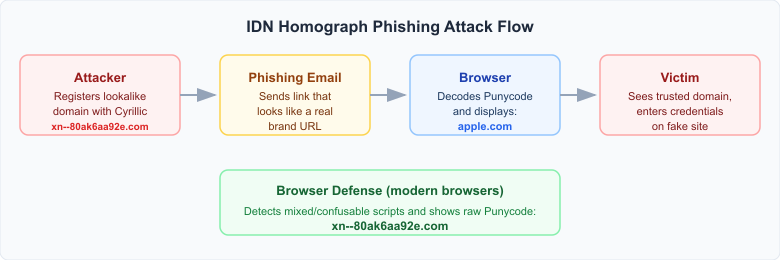 Phishing attack flow using a Punycode lookalike domain
How browsers protect you
After the 2017 apple.com incident, every major browser tightened its IDN display rules. The core principle is the same across all of them: if a domain looks like it could be impersonating something, show the raw xn-- Punycode instead of the decoded Unicode.
Chrome runs the most elaborate checks10. When it encounters a Punycode-encoded label, it converts it to Unicode and then runs mixed-script detection, whole-script confusable detection (an all-Cyrillic label that resembles Latin gets flagged unless the TLD is Cyrillic, like .ru), digit-spoof detection, and skeleton matching against a list of popular domains. If any check fails, you see the Punycode. Despite all that, research has found Chrome still misses around 40% of crafted homograph domains12.
Firefox builds on the "Moderately Restrictive" profile from Unicode Technical Standard #3919. Every character in a label must belong to one script (plus Common/Inherited), or come from an approved combination like Latin + Han + Hiragana + Katakana for Japanese domains11. Mixing Latin with Cyrillic or Greek in the same label is explicitly blocked.
Safari takes the most aggressive stance -- it blocks all IDNs that mix scripts and rejects all-Cyrillic and all-Greek labels on non-matching TLDs12. That's why Safari wasn't vulnerable to the 2017 attack. The downside is that some legitimate IDN domains get displayed as ugly Punycode strings.
None of these defenses are bulletproof. A 2021 USENIX Security paper tested all major browsers and found that every single one could be bypassed with carefully chosen characters from less common Unicode blocks12. The underlying problem is hard: Unicode has over 150,000 characters across dozens of scripts, and any character that visually resembles another is a potential weapon.
How to protect yourself
Modern browsers catch most homograph attacks automatically -- Chrome, Firefox, and Safari all show Punycode for suspicious mixed-script domains by default. But browser defenses aren't perfect, and a few habits close the remaining gaps:
-
Use a password manager. This is the single best defense. Password managers match credentials to exact domain strings -- they won't autofill your Apple ID password on
xn--80ak6aa92e.com, even if it looks identical toapple.comon screen. Every major password manager (1Password, Bitwarden, LastPass, Apple Keychain) handles this correctly. -
Keep your browser updated. Homograph detection gets better with every release. Chrome, Firefox, and Safari all actively maintain their IDN display policies, but those updates only help if you install them. Auto-update is on by default in most browsers -- don't disable it.
-
Type URLs directly for sensitive sites. For banking, email, and shopping sites, type the address yourself rather than following links from emails or messages. It's a simple habit that eliminates the entire attack vector.
-
Hover over links before clicking. Most email clients and browsers show the actual URL in a tooltip or status bar. Phishing emails depend on you not checking.
-
Don't ignore certificate warnings. Attackers can get valid certificates for lookalike domains (as the 2017 apple.com attack proved), but certificate mismatches still catch many phishing attempts.
Citations
-
RFC 1035: Domain Names -- Implementation and Specification. P. Mockapetris, November 1987 ↩
-
RFC 3490: Internationalizing Domain Names in Applications (IDNA). Retrieved March 16, 2026 ↩
-
RFC 1035: Domain Names -- Implementation and Specification. Section 2.3.4. Retrieved March 16, 2026 ↩
-
ICANN: Guidelines for the Implementation of Internationalized Domain Names. Version 4.1, November 2022 ↩
-
ICANN: IDN Annual Report June 2025. Retrieved March 17, 2026 ↩ ↩2
-
Porkbun: Internationalized Domain Names. Retrieved March 17, 2026 ↩
-
RFC 6531: SMTP Extension for Internationalized Email. A. Yang, S. Steele, N. Freed, February 2012 ↩
-
Mozilla: Bug 1563891 -- No support for SMTPUTF8. Retrieved March 17, 2026 ↩
-
Let's Encrypt: Introducing Internationalized Domain Name (IDN) Support. October 21, 2016 ↩
-
Chromium: Internationalized Domain Names (IDN) in Google Chrome. Retrieved March 16, 2026 ↩ ↩2 ↩3
-
Mozilla: IDN Display Algorithm. Retrieved March 16, 2026 ↩ ↩2
-
Hang Hu, Steve T.K. Jan, Yang Wang, Gang Wang: Assessing Browser-level Defense against IDN-based Phishing. 30th USENIX Security Symposium, 2021 ↩ ↩2 ↩3 ↩4
-
InterNetX: Emoji Domains -- Yay or Nay?. Retrieved March 17, 2026 ↩
-
RFC 3492: Punycode: A Bootstring encoding of Unicode for Internationalized Domain Names in Applications (IDNA). A. Costello, March 2003 ↩
-
RFC 3492: Punycode: A Bootstring encoding of Unicode for IDNA. Sections 3 and 6. Retrieved March 16, 2026 ↩
-
Unicode Technical Report #36: Unicode Security Considerations. Retrieved March 16, 2026 ↩
-
Evgeniy Gabrilovich and Alex Gontmakher: The Homograph Attack. Communications of the ACM, 45(2):128, February 2002 ↩
-
Xudong Zheng: Phishing with Unicode Domains. April 2017. Retrieved March 16, 2026 ↩
-
Unicode Technical Standard #39: Unicode Security Mechanisms. Retrieved March 16, 2026 ↩
Updated: March 17, 2026