
IDN homograph attack
An IDN homograph attack is a phishing technique that exploits the visual similarity between characters from different writing systems. The attacker registers a domain that looks identical to a real one -- apple.com, paypal.com, whatever -- but is actually built from lookalike characters pulled from Cyrillic, Greek, or other Unicode scripts. The browser decodes it, shows something that passes casual inspection, and the victim has essentially no way to tell it's fake.
This works because internationalized domain names (IDN) allow non-Latin scripts in domain registration. Under the hood, every IDN is encoded as ASCII via Punycode -- the xn-- prefix you might have noticed in URLs. When a browser receives a Punycode domain, it decodes it back to Unicode for display. That's the gap. Unicode contains over 154,000 characters, and a surprising number of them are pixel-perfect matches for Latin letters1.
The characters that look alike across scripts are called homoglyphs (or confusables, in Unicode's own terminology). The Cyrillic "a" (U+0430) is identical to the Latin "a" (U+0061) in most fonts. Same goes for "o", "c", "e", "p", and "x". An attacker who registers a domain using only these Cyrillic twins gets a string that displays as a familiar Latin name but resolves to a completely different server.
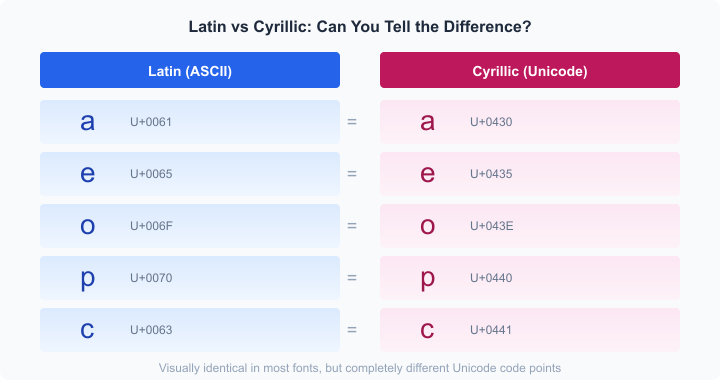 Five common Latin-Cyrillic character pairs that are visually identical
History
The original paper (2001)
Evgeniy Gabrilovich and Alex Gontmakher, researchers at the Technion in Israel, first described the attack in December 2001. Their paper was direct: internationalized domain names would inevitably be exploited for phishing because different scripts contain characters that look the same2. They proved it by registering a variant of microsoft.com using Cyrillic "c" and "o" in place of their Latin equivalents. The domain looked identical in a browser.
Published in Communications of the ACM in February 2002, it reads as remarkably prescient. Everything they warned about came true.
Shmoocon and the first live demos (2005)
The attack stayed academic until February 2005, when Eric Johanson demonstrated a practical exploit at ShmooCon3. He showed that Firefox 1.0, Safari 1.2.5, and Opera 7.54 would all render a spoofed PayPal domain (Cyrillic "a" replacing Latin "a") as the genuine paypal.com. Internet Explorer wasn't vulnerable -- but only because it didn't support IDN display at all.
ICANN issued a public statement within days4. Mozilla pushed an update adding a TLD whitelist to Firefox -- only domains under TLDs with anti-homograph registry policies would show Unicode; everything else fell back to Punycode5.
For a few years, the problem seemed contained.
The 2017 apple.com proof-of-concept
Then Xudong Zheng blew it open again. In April 2017, he registered xn--80ak6aa92e.com, which decoded to what appeared to be apple.com in Chrome, Firefox, and Opera6. Every character was Cyrillic. The domain was entirely single-script, so it sailed past the mixed-script detection that browsers had relied on since 2005. He even got a valid Let's Encrypt certificate for it -- padlock and all.
Chrome shipped a fix in version 58 that added whole-script confusable detection7. Safari and Edge were already safe; they'd been blocking all-Cyrillic domains on non-Cyrillic TLDs. This one incident is probably the reason most developers have heard of Punycode.
How the attack works
No exploit code, no zero-day. It's pure visual deception.
 Attacker flow: find lookalikes, register domain, get certificate, deploy phishing site
Finding confusable characters. The attacker picks characters from non-Latin scripts that match the target domain's letters. Cyrillic is the go-to because it has the highest overlap with Latin lowercase, but Greek, Armenian, and Cherokee also contain usable homoglyphs.
Registering the domain. Any registrar that supports IDN will accept the registration. The registrar converts Unicode to Punycode -- something like xn--80ak6aa92e.com -- and submits it to the registry. DNS never sees Unicode; it only stores and resolves ASCII.
Obtaining an SSL certificate. Domain Validation (DV) certificates only check that the applicant controls the domain -- not that it's legitimate8. The CA issues the cert. The browser shows a padlock.
Deploying a phishing site. The victim clicks a link in a phishing email, sees a URL that looks exactly right, with HTTPS and a padlock. Unless they manually inspect the SSL certificate or paste the URL into a text editor, there's no visible indication of fraud.
Worked example: impersonating epic.com
| Position | What you see | Actual character | Script | Code point |
|---|---|---|---|---|
| e | e | Cyrillic ie | Cyrillic | U+0435 |
| p | p | Cyrillic er | Cyrillic | U+0440 |
| i | i | Cyrillic i | Cyrillic | U+0456 |
| c | c | Cyrillic es | Cyrillic | U+0441 |
The resulting domain encodes to xn--e1afmkfd.com in Punycode. A browser that doesn't flag it displays epic.com.
The confusables problem
The Unicode Consortium is aware of this. Unicode Technical Standard #39 (UTS #39, "Unicode Security Mechanisms") defines the framework for identifying confusable characters, and the companion data file confusables.txt maps roughly 6,565 characters to their visual equivalents9.
Mixed-script confusables are the easiest to detect. A domain mixing Latin and Cyrillic characters in the same label? Just check whether the label mixes scripts. Every modern browser catches these.
Whole-script confusables are the hard ones. The entire label uses one non-Latin script, but the result looks Latin. The 2017 apple.com attack was this type -- all Cyrillic, no script mixing to detect. The browser has to recognize that the Cyrillic string just happens to look like a Latin word.
UTS #39 also defines a skeleton function -- it maps any string to a canonical form by replacing each character with a representative from its confusable set. Two strings with the same skeleton are confusable. Chrome uses this to compare domains against a list of top sites7.
Which script pairs are most dangerous?
| Script pair | Confusable lowercase letters | Risk |
|---|---|---|
| Latin-Cyrillic | a, c, e, o, p, x, y, s, i, d, h | Very high |
| Latin-Greek | o, v, plus many uppercase (A, B, E, H, K, M, O, P, T, X, Y, Z) | Medium |
| Latin-Armenian | o, n, u, g | Medium |
| Latin-Cherokee | Many uppercase pairs | Lower |
Cyrillic is the biggest threat by a wide margin. You can spell entire English words -- ace, cope, space -- using nothing but Cyrillic.
Browser defenses
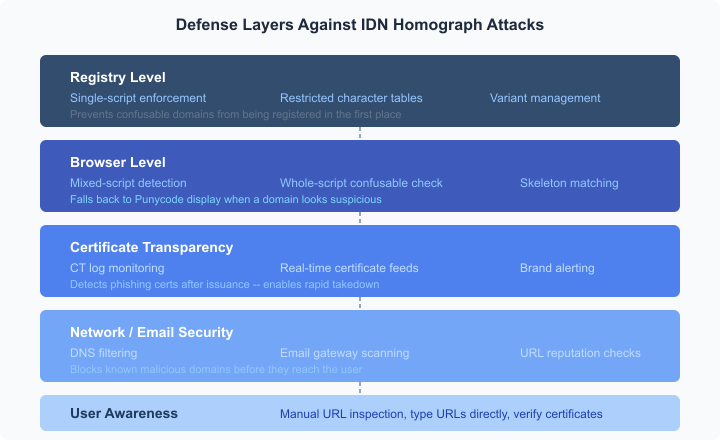 Defense layers: registry, browser, certificate transparency, network/email security, user awareness
Chrome runs a multi-step gauntlet on every domain label: UTS #46 conversion, identifier status checks, script mixing validation, invisible character detection, whole-script confusable detection, and skeleton matching against top domains. If any check fails, the user sees raw Punycode7. It's the most elaborate system among the major browsers, though a 2021 USENIX study found it still missed a substantial fraction of crafted homograph domains10.
Firefox applies the "Highly Restrictive" profile from UTS #39. Latin mixed with Cyrillic or Greek is never allowed in the same label. It also maintains a TLD whitelist -- registries with anti-homograph policies get more permissive display. Users who want maximum safety can set network.IDN_show_punycode to true in about:config to force Punycode everywhere.
Safari is the most conservative. Apple maintains a whitelist of scripts that don't contain Latin-confusable characters. Cyrillic, Greek, and Cherokee are always displayed as Punycode on non-matching TLDs. This is why Safari was never vulnerable to the 2017 attack -- Apple chose to occasionally show ugly xn-- strings for legitimate Cyrillic domains rather than risk letting a phishing domain through.
Edge inherited Chrome's IDN policy when it switched to Chromium in 2020.
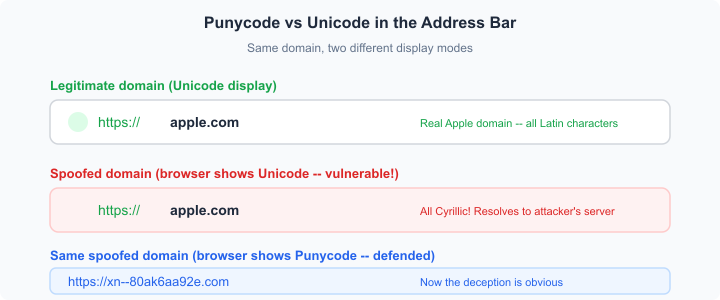 Same spoofed domain shown in Unicode (vulnerable) vs Punycode (defended)
That 2021 USENIX study deserves a closer look. The researchers tested Chrome, Firefox, Safari, Edge, and IE against crafted homograph IDNs and found that every browser could be bypassed. Safari caught 90.3% of homograph domains. Firefox caught only 6.1%. Chrome fell somewhere in between10. Browser defenses aren't monotonically improving, either -- Chrome had actually reversed some rules over time to avoid breaking legitimate domains.
Registry and certificate defenses
Browser detection is one layer. Preventing confusable domains from being registered is another.
ICANN's IDN Implementation Guidelines require registries to publish allowed character lists, restrict labels to a single script, and implement variant management for characters that are considered equivalent (common in CJK)11. Script-restricted TLDs like .рф (Russia, Cyrillic only) make Latin-impersonation structurally impossible. The .de registry allows only a curated set of Latin characters with diacritics.
On the certificate side, DV certificates remain the weak link. Let's Encrypt's official position is that CAs aren't well positioned to police domain names -- that's the registrar's job8. They have a point; with thousands of trusted CAs, an attacker rejected by one just goes to another. But Certificate Transparency (CT) logs offer detection after the fact. Every publicly trusted certificate gets logged, and tools like CertStream provide real-time feeds. Security teams can monitor for certificates issued to brand-lookalike domains12.
Real-world incidents
This isn't just a researcher toy.
Akamai published a study in November 2022 analyzing DNS query traffic over 32 days and found 6,670 active homograph domains being queried by real devices. On average, 67 new ones appeared daily. A total of 29,071 devices accessed at least one homograph domain during the observation period, and the access patterns -- typically 2-5 queries per device -- suggested unintentional visits from phishing links13.
Bitdefender's 2022 analysis documented homograph attacks targeting financial institutions and cryptocurrency platforms -- "a perfect target" because crypto transactions are irreversible14. They also found that Microsoft Office applications (Outlook, Word, Excel) were vulnerable in a different way: hovering over a link in a document showed the Unicode-decoded form, not the Punycode. Office had no confusable detection at all.
How to protect yourself
For individuals
- Type URLs manually for sensitive sites (banking, email, crypto). Don't click links from emails or messages.
- Check the certificate if something feels off. Click the padlock, look at the domain in the certificate details.
- Firefox users: set
network.IDN_show_punycodetotrueinabout:config. It forces Punycode display for all IDN domains. Ugly, but effective. - Use a password manager. A password manager won't autofill credentials on a homograph domain because it matches on the actual domain string, not the visual appearance. This is probably the single best passive defense.
- Keep your browser updated. The defenses get incrementally better with each release.
For organizations
- DNS-level filtering through services like Cisco Umbrella or Cloudflare Gateway can block known homograph domains before they reach users.
- Email gateway scanning -- most enterprise email security products check URLs for homograph patterns.
- Certificate Transparency monitoring via CertStream or SSLMate's Cert Spotter provides real-time alerts when certificates appear for brand-lookalike domains.
- Register defensive variants of your brand's domain using common homoglyph substitutions. It's tedious, but it prevents attackers from getting there first.
The tension that won't go away
The fundamental problem is that visual similarity is subjective. Whether two characters "look the same" depends on the font, the rendering engine, the screen resolution, and the user's familiarity with the script. Unicode grows with every version -- more characters from more scripts, expanding the potential attack surface.
You can't enumerate every confusable pair, because the visual similarity is a property of rendering, not code points. A new font could create new confusable pairs that nobody anticipated.
The best we've got is layered defense: registries restricting confusable registrations, browsers detecting and flagging them, CAs logging everything transparently, security products monitoring DNS and CT logs, and users who understand that a padlock and a familiar-looking URL aren't guarantees of anything.
Citations
-
Unicode Consortium: Unicode 16.0.0. Released September 10, 2024. Retrieved March 1, 2026 ↩
-
Evgeniy Gabrilovich and Alex Gontmakher: The Homograph Attack. Communications of the ACM, 45(2):128, February 2002 ↩
-
Computerworld: Experts: International domain names may pose threat. February 2005. Retrieved March 1, 2026 ↩
-
ICANN: ICANN Statement on IDN Homograph Attacks. February 23, 2005. Retrieved March 1, 2026 ↩
-
Mozilla Bugzilla: Bug 279099 -- Protect against homograph attacks. Retrieved March 1, 2026 ↩
-
Xudong Zheng: Phishing with Unicode Domains. April 2017. Retrieved March 1, 2026 ↩
-
Chromium: Internationalized Domain Names (IDN) in Google Chrome. Retrieved March 1, 2026 ↩ ↩2 ↩3
-
Let's Encrypt: The CA's Role in Fighting Phishing and Malware. October 29, 2015. Retrieved March 1, 2026 ↩ ↩2
-
Unicode Technical Standard #39: Unicode Security Mechanisms. Retrieved March 1, 2026 ↩
-
Hang Hu, Steve T.K. Jan, Yang Wang, Gang Wang: Assessing Browser-level Defense against IDN-based Phishing. 30th USENIX Security Symposium, 2021 ↩ ↩2
-
ICANN: IDN Implementation Guidelines. Version 4.1, April 2025. Retrieved March 1, 2026 ↩
-
Hardenize: Certificate Transparency Monitoring for Phishing Detection. Retrieved March 1, 2026 ↩
-
Akamai: Watch Your Step: The Prevalence of IDN Homograph Attacks. November 2022. Retrieved March 1, 2026 ↩
-
Bitdefender: Homograph Phishing Attacks -- When User Awareness Is Not Enough. 2022. Retrieved March 1, 2026 ↩
Updated: March 16, 2026